The teams that book the most demos don’t send more messages. They write to the right people at the moment those people show interest, and hand the repetitive work to AI.
10 chapters · 16 copy-ready prompts · a video tutorial · one checklist
You commented “AUTO” under my post: here is the playbook. It’s the method we apply every day at Yauda to book our own meetings. Nothing theoretical: every prompt ran on our own pipeline before it landed here.
Paul Boëssé · Co-founder of Yauda
Who it’s for
B2B sales teams and founders who prospect on LinkedIn with a small team, or alone, and don’t have enough hours in the week.
What you’ll find
The method, the signals to follow for your market, then the step-by-step to run your prospecting from Claude, with copy-ready prompts.
Who we are
Yauda is a French LinkedIn prospecting tool. Our agent spots the people showing interest, qualifies them against your criteria and starts the conversation from your account. The 7-day free trial gives you access to everything. It’s exactly the system we use for our own prospecting.
The problem
The problem you already know
You know your ideal customer: the roles, industries and company sizes that buy from you. You build a list, write a sequence and hit send. A few replies come in, then the list runs dry, and the best profiles in your market have already ignored you once.
The usual reflex is to send more: longer lists, more sequences, more hours on Sales Navigator. Reply rates fall further, and the team burns out long before meetings show up.
The 12 mistakes that cost you meetings
If your prospecting has plateaued, at least one of these is often to blame. Spot yours: the rest of the playbook fixes them one by one.
The mistake
What it costs you
Confusing ideal profile with buying intent
A matching profile says nothing about whether they want to buy this week
Writing with no reason to write now
Without a “why now”, your message looks like everyone else’s
Making up for a low reply rate with volume
Your LinkedIn account takes risks, and replies still don’t follow
Faking personalisation
“Loved your latest post” fools nobody anymore
Pitching your offer in the first message
Asking for a demo before any conversation gets you ignored
Adding a link too early
A link in the first message drops replies and smells like spam
Following up with “just bumping this”
The follow-up adds nothing and gives no reason to answer
Letting automation talk after a reply
A warm prospect who gets an automated follow-up cools off immediately
Following signals that are too weak
Your list fills up with lukewarm profiles
Ramping LinkedIn volume too fast
Your account can get restricted
Spending your selling hours hunting for prospects
Every hour outside a meeting is a lost selling hour
Never checking prospect quality
Bad targeting can run for weeks without anyone noticing
The method
Timing first, AI second
The teams that book the most demos fix these mistakes with two changes.
They only write to people showing strong intent. Matching your ideal customer doesn’t tell you whether this is the right week to talk. A signal does: the person just reacted to a competitor’s post, commented on a topic you cover, or engaged with your content.
They hand the repetitive work to AI: finding those people, writing a first draft, scheduling follow-ups. The team’s hours go to the conversations that turn into demos.
Put together, it makes a four-step recipe:
01
The ideal customer
decides who to contact.
02
Signals
decide when to contact them.
03
AI
does the repetitive work: research, sequences, first drafts, follow-ups.
04
You
take over as soon as the prospect replies.
Every message has a reason to exist, volume is no longer your only lever, and nobody spends their day on what an AI does very well. Writing soon after a signal, while the topic is still fresh, is the hypothesis we apply at Yauda: measure it on your own campaigns rather than taking our word for it.
Signals
The 6 signals to follow
A signal is a visible action on LinkedIn showing that someone is thinking about your topic right now. Yauda follows six families, which we group by nature: the first four give hints of interest, the last two mostly serve targeting. The agent reviews your signals every 48 hours: it’s regular detection, not real time. Each keyword, profile or competitor you add counts as one signal, up to 15 per agent.
Direct interest
The person has already turned to you or your brand.
Signal
What Yauda spots
What it indicates (and its limits)
You & your company
People who visit your profile, follow your company page or react to your posts
They’ve already shown interest in you: often the most receptive. A visit isn’t buying intent, hence qualifying afterwards
Indirect interest
The person cares about your market, your category or those who talk about it.
Signal
What Yauda spots
What it indicates (and its limits)
Companies & competitors
People who interact with a competitor’s posts
They care about your category, and maybe about alternatives: verify when qualifying, don’t assume
Engagement & interest
People who react to content about the keywords you choose
The topic is probably on their mind right now
LinkedIn profiles
People who interact with the creators and experts you choose
They’re learning about your field
Targeting and qualification
These two families don’t measure interest: they help you find the right profiles and filter them.
Function
What Yauda spots
What it indicates (and its limits)
LinkedIn search (ICP)
Profiles matching your filters: role, industry, size, region
The foundation of any campaign, to cross with an interest signal
Lookalike audience
Profiles that resemble your best customers
They look like your customers, which doesn’t mean they’re interested: very useful once you have a few reference customers
Tip: to pick the LinkedIn profiles to follow, look at who comments on their last three posts. If they’re your decision-makers, keep them.
Which signals to pick for your situation
Find the row that looks like you and start with those signals. You’ll add others later.
Your situation
Start with these signals
You sell in a new category and your buyers are still learning the words to describe it
Engagement & interest on your category’s words, industry LinkedIn profiles, competitors
You’re a founder carrying sales alone and your market is too small to burn
You & your company, competitors, LinkedIn profiles
Your buyers talk publicly about the problem you solve
Engagement & interest on the phrases they use to describe it, competitors, LinkedIn profiles
Your market has well-known competitors with an active audience
Competitors, LinkedIn profiles, engagement on your category’s content
You sell a trust-based service on long cycles and your network drives revenue
You & your company, LinkedIn search (ICP), lookalike audience
Simulator
Prepare your agent configuration
Enter your target: the simulator picks the signal families to start with and prepares the prompt to paste into Claude. Nothing is sent, everything stays in your browser.
Your starting point
Start with these signals
Engagement & interest on your category’s words
Industry LinkedIn profiles
Competitors
Ready-to-paste prompt for Claude
Here is my ideal customer: target role "[target role]", industry "[industry]".
Here are my main competitors: [names]
Prepare my Yauda agent settings, 15 signals max in total:
1. Competitors: the 2 or 3 company pages to follow.
2. Keywords: 5 words or phrases my buyers use
when the topic is on their mind (my category's vocabulary and
phrases describing their problem).
3. LinkedIn profiles: 3 or 4 content creators followed by my buyers,
with the reason for each choice.
4. Exclusions: roles, companies and industries to rule out.
Rank each item from strongest to weakest.
A starting point, not a guarantee: test for two weeks, then adjust one signal at a time.
Once Claude is connected to Yauda, you describe your prospecting in plain language and Claude builds it directly in your account, with no copy-pasting between ten tools.
The connection runs on MCP (Model Context Protocol), an open standard that lets Claude work inside your tools the way a colleague would. The work is then split like this:
1You describe your ideal customer in a few sentences.
2Claude refines it, suggests the signals to follow and writes your messages.
3Claude creates the campaign in Yauda as a draft: sequence, messages, tone, follow-up rhythm.
4Yauda spots prospects emitting a signal, then sends invitations and messages from your LinkedIn account.
5You activate the campaign, then take over as soon as a prospect replies.
Who
Their role
Claude
The brain: it refines your ideal customer, finds approach angles, writes the messages and the sequence
The Yauda connector
The wiring: it lets Claude read your accounts, lists and campaigns, then create or edit your campaigns as drafts
Yauda
The action on LinkedIn: the agent detects signals, qualifies profiles and sends from your account, with quotas and a gradual ramp-up that limit the risk to your account
You
The final say: you activate campaigns, review messages and take the meetings
For safety, Claude can neither activate, pause nor delete a campaign. Nothing goes out on LinkedIn until you click yourself.
What you need
A Claude account. Custom connectors are available on every plan, including the free plan, which is limited to one custom connector.
A Yauda account with a subscription or a running trial: without one, the connector refuses access. The 7-day trial is enough to test everything, connector included.
A LinkedIn account.
30 minutes to set up, then one hour a week to steer.
Chapter 01
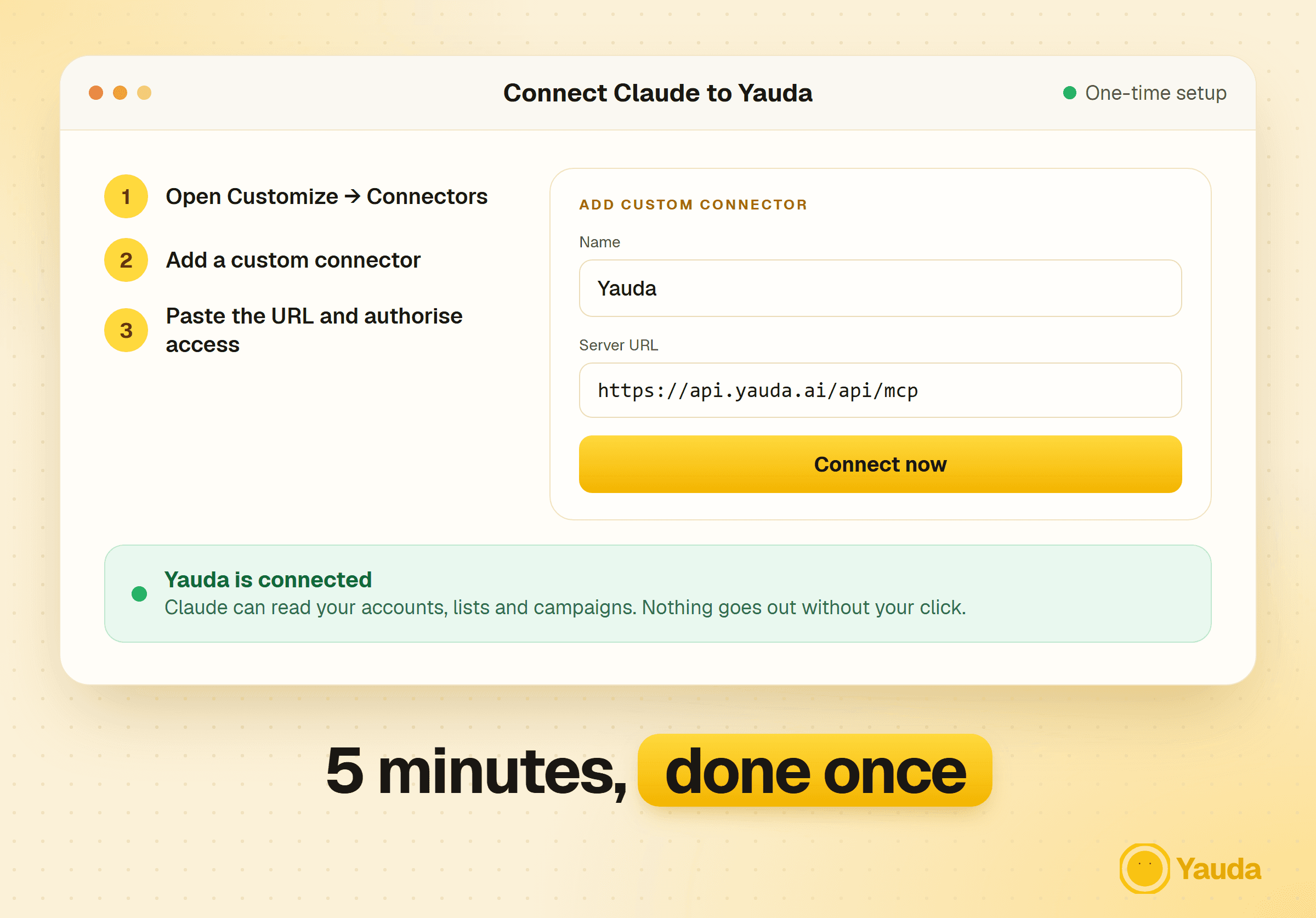
Connect Claude to Yauda in 5 minutes
This is the technical part, and the simplest. You only do it once.
1Open connectorsIn Claude (claude.ai or the desktop app), go to Customize, then Connectors.
2Add a custom connectorClick + Add, then Add custom connector.
3Fill in YaudaName the connector “Yauda” and paste this address: https://api.yauda.ai/api/mcp
4Authorise accessAn authentication screen appears: choose Connect now. Claude opens the Yauda sign-in page: log in and confirm. No key to copy, and your password is never sent to Claude.
5Turn Yauda on in the conversationClick the + at the bottom left of the input box, open Connectors and switch Yauda on.
Prompt to copy · Check that everything works
List my LinkedIn accounts and my contact lists in Yauda.
If it answers with your accounts, you’re connected. The video tutorial at the bottom of the page shows each screen.
On a Claude Team or Enterprise plan, an organisation owner adds the connector in the organisation settings. Each member then just clicks Connect.
Define your ideal customer and qualify your prospects
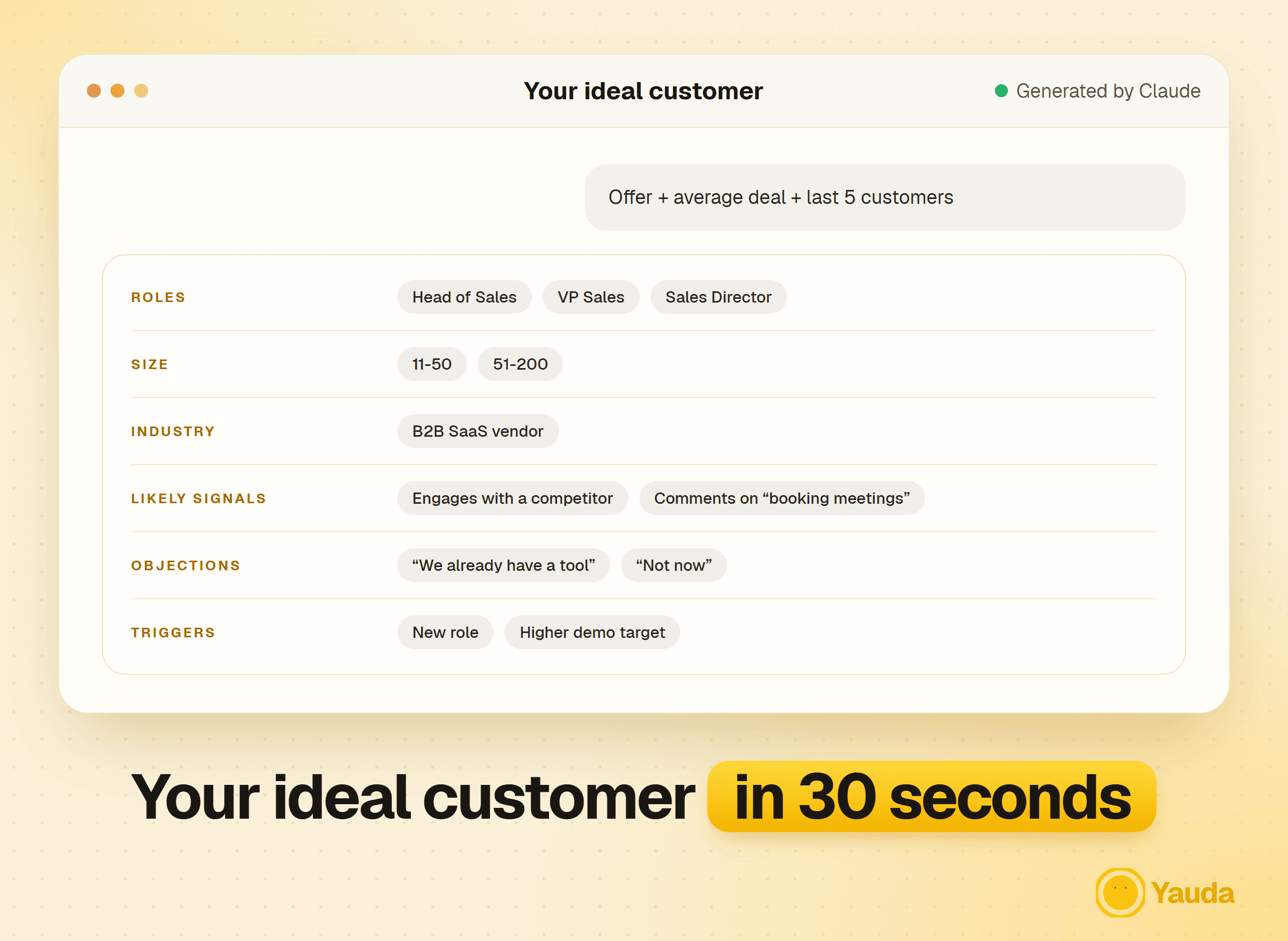
This is the step many rush, and it’s often why “AI” campaigns stay average. Claude will only find the right people if it knows exactly who they are. A vague ideal customer produces vague lists: “tech SMBs in Europe” isn’t an ideal customer, it’s a directory.
Prompt to copy · 1. Define your ideal customer
Here is my offer: [describe it in 3 lines max]
My average deal size: [amount]
My last 5 signed customers: [role, industry and company size for each]
From this data, build my ideal customer.
Give me: the exact roles, company size, industry,
likely buying signals, frequent objections
and decision triggers.
Be very precise. No generic answers.
Prompt to copy · 2. Profile each decision-maker
I sell [product] to [role] at [size / industry] companies.
Describe their 3 current priorities, what would make them look bad internally,
the words they use to describe their problem and their 5 likely objections
to a solution like mine.
Format: a one-page sheet I can reuse in my prompts.
Prompt to copy · 3. Qualify a prospect in one message
Here is a prospect: [their LinkedIn profile content, or name, role,
company and the signal Yauda spotted]
Here is my ideal customer: [paste the result of prompt 1]
Score this prospect from 0 to 10 on three criteria:
- Fit with my ideal customer (role, company, industry)
- Buying maturity (intent signals spotted)
- Reachability (likelihood they reply)
Give a final verdict: contact now, keep warm, or discard.
Justify in 2 lines max.
In 30 seconds you have a precise ideal customer. Keep it: every following step uses it. Then ask Claude for its “settings” version: the filters to enter in the Yauda agent (roles, industries, size, region and exclusions). For qualification, you can run dozens of profiles in one session: it’s your first filter, very handy for profiles you’re unsure about.
Chapter 03
Choose and plug in the right signals
Signals make all the difference between a message that lands and one that smells like a robot. The right prospect at the wrong time is still the wrong prospect. Claude helps you choose the right ones, then you set them in the Yauda agent.
Prompt to copy · Prepare your agent settings
Here is my ideal customer: [paste it]
Here are my main competitors: [names]
Prepare my Yauda agent settings, 15 signals max in total:
1. Competitors: the 2 or 3 company pages to follow.
2. Keywords: 5 words or phrases my buyers use
when the topic is on their mind (my category's vocabulary and
phrases describing their problem).
3. LinkedIn profiles: 3 or 4 content creators followed by my buyers,
with the reason for each choice.
4. Exclusions: roles, companies and industries to rule out.
Rank each item from strongest to weakest.
Check each suggested profile with the last-three-posts rule, then enter these settings in the Yauda agent. Each keyword, profile or competitor counts as one signal: the screen shows the total, 15 at most. The agent runs continuously and reviews your signals every 48 hours.
This is where the setup, the ideal customer and the signals start to pay off. Open a new conversation with the Yauda connector on, and follow these five steps.
1Let the agent fill your listProspects emitting a signal land in your Yauda contacts, scored against your ideal customer, with the signal that surfaced them.
2Review them 20 minutes a weekApprove or discard each profile. If in doubt, run it through the qualification prompt from chapter 2.
3Have Claude build the campaignClaude creates it as a draft in Yauda: sequence, messages, tone, rhythm. Use the prompt below.
4Review and activateOpen the campaign in Yauda, check the messages and activate it yourself. With review-before-send, you approve every hook before it goes out, then loosen the reins once you trust the targeting.
5Track resultsAsk Claude “Where do my campaigns stand?”: it reads your invitations sent and accepted, messages sent and acceptance rates, then suggests adjustments. The reply rate is in Yauda. To edit an active campaign, pause it first.
Prompt to copy · Create the campaign
Create a Yauda campaign on my list [name] with the goal of booking meetings:
invitation without a note, wait 1 day, then a first message with an
AI-personalised hook, wait 4 days, follow-up, wait 6 days, break-up message.
Send between 9am and 6pm, direct tone, AI reply disabled.
Turn on review-before-send for the first message.
Prompt to copy · Sort an imported list
Here is a list of accounts with industry, headcount and latest known information: [paste]
Score each from 1 to 5 on fit with this ideal customer: [paste it]
Sort them into three groups: work this week (A), this month (B), watch (C).
Justify each A account in one line.
A good LinkedIn message reads like one attentive person writing to another. The golden rule: open with curiosity, and keep your pitch for later. Swapping {first name} and {company} isn’t personalisation: prospects spot it instantly.
1What you noticed (1 line)The precise signal that makes you write, brought up naturally, without intrusive phrasing like “I saw you liked that post”. Example: “I see a lot of sales teams struggling to reach IT directors right now.”
2Why you (1 line)What gives you the right to bring it up. Example: “I work with about ten SaaS vendors stuck on exactly this.”
3An open question (1 line)No pitch, no “I’d love to show you”. A question people want to answer. Example: “How are you handling it internally today?”
4An easy way out (1 line)Remove the pressure so not replying stays comfortable. Example: “If it’s not a topic for you, no worries, it’s still useful to know.”
What everyone receives daily
Hi Camille, loved your latest post! At Yauda we help teams like yours double their demos. Are you free for a 30-minute chat this week? Here is our site: …
What gets a reply
Hi Camille, I see a lot of sales teams struggling to reach IT directors right now. I work with about ten SaaS vendors stuck on exactly this. How are you handling it internally today? If it’s not a topic for you, no worries, it’s still useful to know.
Prompt to copy · Write 3 versions of the first message
Here is a qualified prospect: [name, role, company]
Here is the signal Yauda spotted: [signal]
Here is my offer: [2-line summary]
Write 3 versions of a first LinkedIn message with this structure:
1. What I noticed: the concrete signal, brought up without intrusive phrasing
2. Why me: the common ground or my credibility
3. An open question, without presenting the offer
4. An easy way out
400 characters max. Human tone, no jargon,
no link, no price.
Prompt to copy · Audit the message you already send
Here is the message I currently send as a first contact: [paste it]
Run it against these mistakes: fake personalisation, offer pitched too early,
link, no reason to write now, closed question.
For each mistake found, quote the sentence and suggest a rewrite.
Finish with a corrected version under 400 characters.
Claude gives you three versions: keep the one that sounds like you. To apply it to a whole campaign, ask it to turn it into the prompt for Yauda’s AI hook. Each prospect then receives a message built on their own signal.
The classic pattern is one message, a long silence, then a generic follow-up five days later. It earns very little: most replies come after the second or third follow-up, and most follow-ups are “just bumping this”. Here’s the sequence we run instead. Yauda stops it automatically as soon as the prospect replies. Keep the AI auto-reply disabled (the default when Claude creates the campaign): you are the one who answers.
1Day 0: the first messageThe one from chapter 5: the signal, then an open question.
2Day 4: a follow-up that adds somethingNever “just checking in”. Bring something new: an article, a number, a sharper question. Example: “I came across this study on exactly your topic. Curious for your take.”
3Day 10: the break-up messageSay clearly it’s your last message, without guilt-tripping anyone. Many reply at this point, out of politeness or curiosity. Example: “I won’t push further. If the topic lands on your desk, my door stays open.”
4Day 30 and beyond: come back on a new signalIf the Yauda agent surfaces the same prospect with a new signal three or four weeks later, open a fresh conversation with a different angle rather than waking the old thread.
Prompt to copy · Write the next step of the sequence
Here is a prospect mid-sequence: [name and messages already sent]
Here are the new signals spotted since the last message:
[signals, or "none"]
Days since the first message: [X]
Write the next step of the sequence:
- 10 days or more since the first message, no reply:
break-up message
- new signal spotted: new conversation, with a new hook
- otherwise: a follow-up that adds something new
For a whole campaign, ask Claude to write the follow-ups directly into the Yauda sequence: it adds them to the draft, you approve. Give delays step by step: in Yauda, each wait counts from the previous step. For a break-up on day 10, that’s 4 days, follow-up, then 6 days.
Chapter 07
From reply to booked meeting
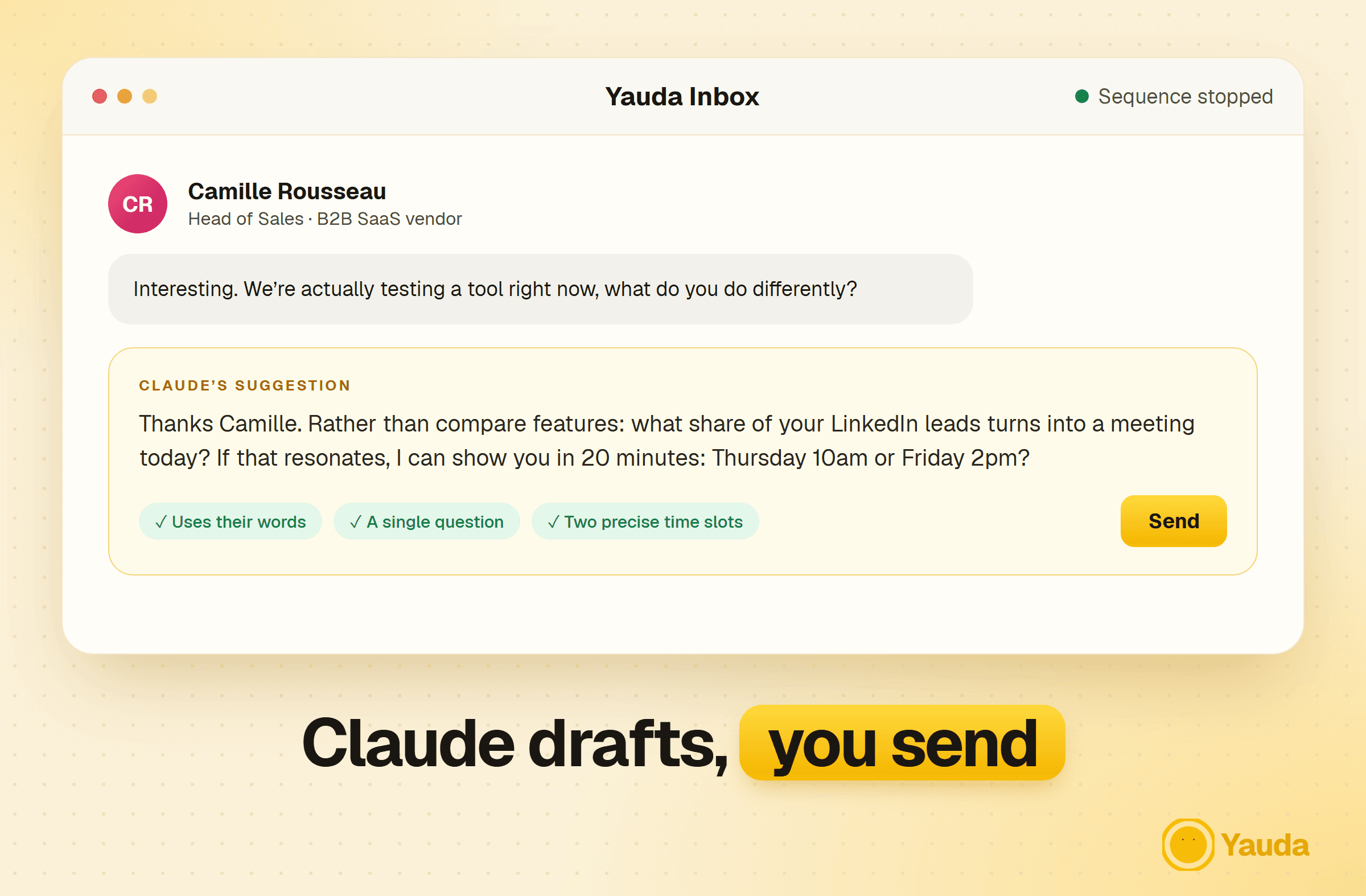
As soon as a prospect replies, Yauda stops the sequence and, with the AI auto-reply disabled, hands the conversation back to you. This is where a human makes the difference, and where Claude saves you precious time. Qualify in the written conversation, before the meeting: a meeting with an unqualified prospect costs your team an hour and returns nothing.
1Reply fastReplies land in the Yauda Inbox. A reply handled the same day keeps the conversation warm.
2Have Claude prepare your answerPaste the thread with the prompt below: it suggests a reply that picks up the prospect’s own words.
3Qualify with one questionThe one that decides whether a meeting is worth it for you: team size, current project, deadline. Write down what’s missing instead of guessing.
4Offer two precise time slotsRather than “when are you free?”. If your calendar is connected to Claude, it suggests your free slots. Otherwise, send your booking link once interest is confirmed.
5No news despite a very hot signal?Switch to phone or email with your usual tools. The goal isn’t to write twice as much, but to follow the conversation where the prospect really is.
Prompt to copy · Prepare the reply
Here is the thread with my prospect: [paste the conversation]
Here is my ideal customer: [paste it]
My goal: book a 20-minute meeting.
Suggest a short reply that:
- picks up their words,
- answers their question if they ask one,
- asks a single question to qualify their need,
- offers two precise time slots if the interest is clear.
If their reply is an objection, tell me which one
and suggest the best way to answer it.
Prompt to copy · Qualify with a framework (BANT)
Here is the LinkedIn thread with this prospect: [paste]
Assess it with BANT (budget, authority, need, timing). For each criterion,
say what is confirmed, what is assumed and what is unknown.
Conclude with a single option: book the meeting, ask one more question
(which one?), or put on hold.
Claude prepares, you send. The meeting remains a human-to-human affair.
Chapter 08
Handle objections without justifying yourself
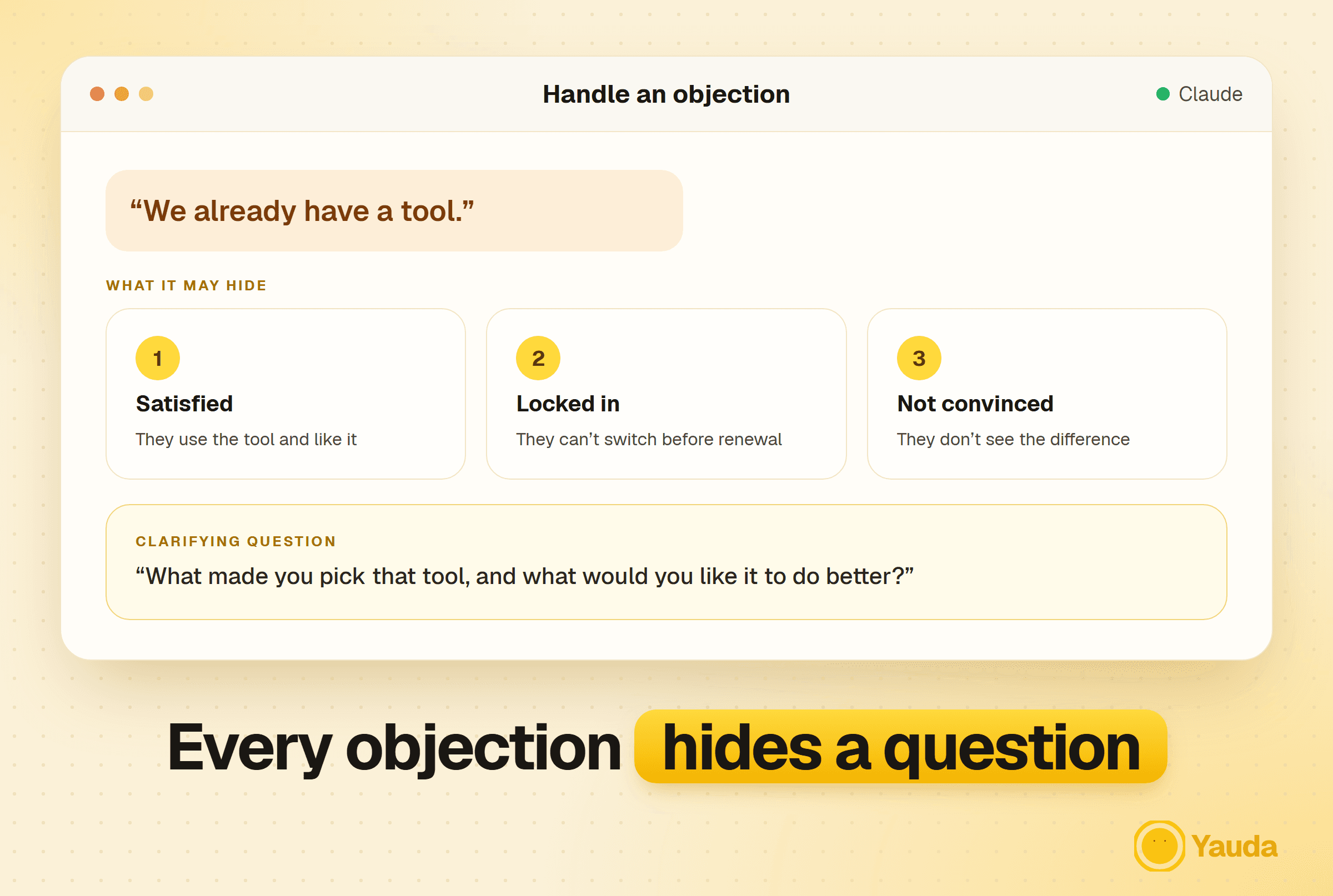
“Not now”, “too expensive”, “we already have a tool”. Objections always come back, and improvised answers rarely land. The right answer almost always starts with a question, not an argument.
List your 10 most frequent objectionsAnd what they really hide: a budget, a running contract, doubt about results, or just a polite reflex.
A clarifying question before any answerIt shows you’re listening and tells you which objection you’re really facing.
Lean on concrete proofA customer case, a number, a demo. Never one more argument.
Prompt to copy · Answer an objection
A prospect replied: "[objection]".
Context: [persona, thread].
Explain what this objection may hide (3 hypotheses),
propose a clarifying question, then a short, natural answer
for each hypothesis. Avoid any defensive tone.
Chapter 09
Prepare the discovery call
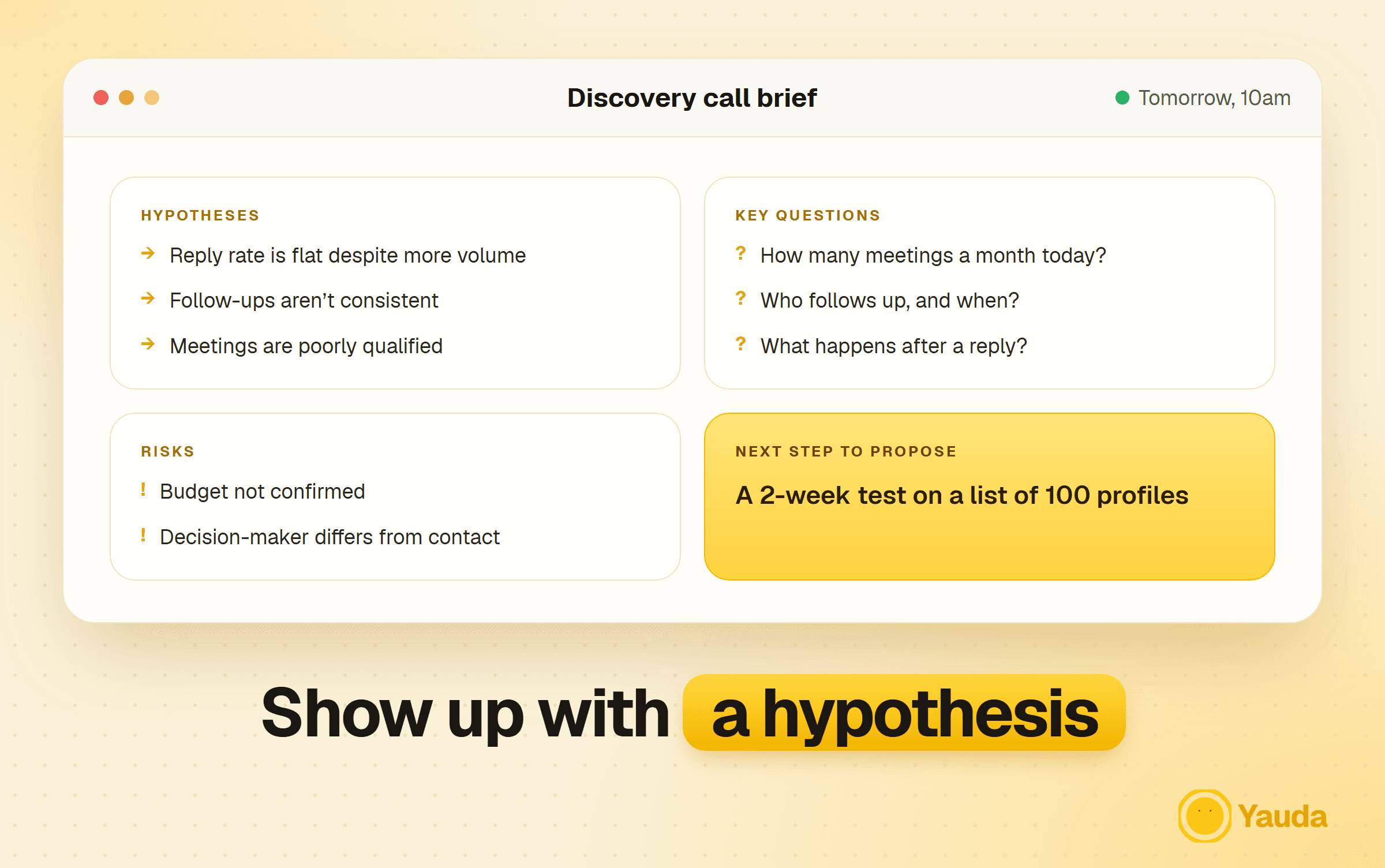
The first five minutes decide what follows. Showing up without a hypothesis lets the prospect drive. A ten-minute brief with Claude is enough to change the quality of the call.
Prepare 3 hypotheses about their problemTo confirm or reject during the call, not to recite.
Write your most important questions in orderThe first two or three decide the quality of the conversation.
Decide the next stepThe one you’ll propose at the end of the call, before you even pick up.
Prompt to copy · Prepare the brief
I'm meeting [first name, role] from [company] tomorrow.
What I know: [context, LinkedIn thread, signal].
Prepare a brief: 3 hypotheses about their problem, 8 discovery questions
ranked by priority, the 2 main risks to the deal,
and the next step to propose at the end.
Chapter 10
Steer: the 4 numbers and a CRM that doesn’t lie
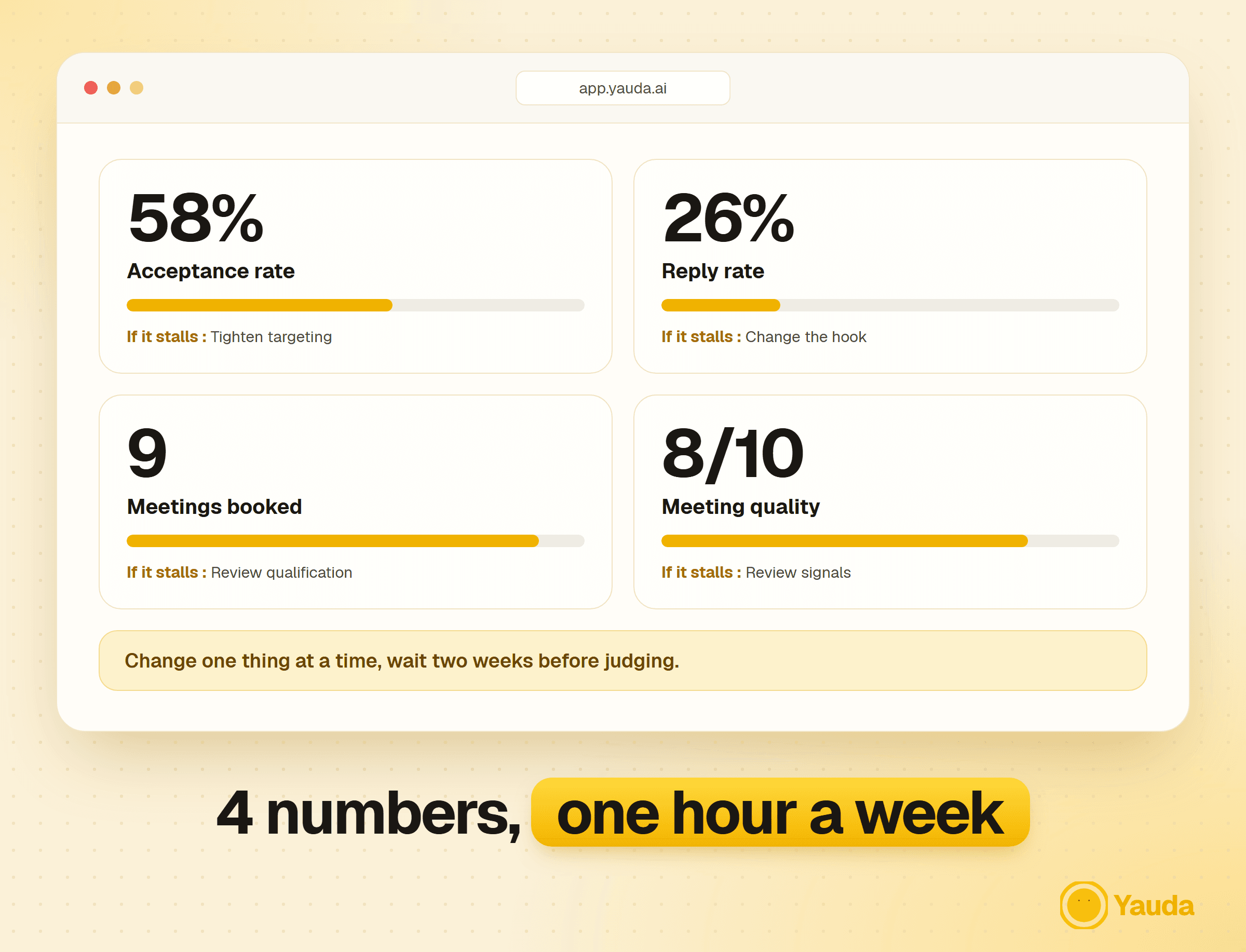
Four numbers are enough to know whether your system runs, and where to act if it stalls. An outdated CRM lies, and a pipeline that lies leads to bad decisions: after every exchange, write down the status, a dated next step and what you learned.
Number
What it tells you
If it stalls
Invitation acceptance rate
Whether your targeting and profile inspire trust
Tighten targeting, rework your profile headline
Reply rate
Whether your messages make people want to answer
Change the hook (chapter 5)
Meetings booked
Whether the system fills your calendar
Review qualification and your replies (chapter 7)
Meeting quality
Whether the right profiles show up
Review signals and exclusions (chapter 3)
Prompt to copy · Weekly check-in
Where do my Yauda campaigns stand? For each one give me: invitations sent
and accepted, acceptance rate, messages sent.
Spot the one underperforming, form a hypothesis about the cause
(targeting, signal, hook, follow-up) and suggest ONE single change to test.
Prompt to copy · Review the pipeline
Here is my pipeline export (stage, amount, last activity, next step): [paste]
Spot at-risk deals, those without a dated next step
and the stages where deals stall. Propose 3 priority actions for the week.
Change one thing at a time and let it run two weeks before judging: first the message, then the signals, then the target. Changing two things at once means not knowing which one worked.
Ask “who’s already talking about it?” before “who fits?”. Follow your category’s words and the phrases describing the problem you solve.
02
Block 20 minutes a week to review your prospects. Approve, then let the agent handle timing and follow-ups.
03
Follow your competitors’ audience. People interacting with them care about your category and may already be comparing: it’s up to you to check in the conversation.
04
Give every reply to a human. Automation opens conversations, you close them.
05
Open with curiosity. Take an interest in the situation behind the signal before talking about your product.
06
Aim narrow, then dig. Fewer, better-targeted meetings beat a calendar full of bad profiles.
Checklist
Before you activate your first campaign
Bonus video
The MCP tutorial, screen by screen
The fastest way to connect Claude to Yauda and run your first prompt. Follow along with chapter 1 open.
The teams that book the most demos don’t win by sending more. They write to people who already show interest, let AI do the repetitive work and take over as soon as someone replies.
Launch your first agent
With Claude and Yauda, this system is up in under an hour. 7-day free trial, full access, cancel anytime.